
EN

The installation stops with the an error message about Office. What is wrong?

You will need to rerun Office setup to install .NET programmability support.

Do the following:

  • Open Add/Remove programs in control panel (Programs)Select Microsoft Office 2003 Professional and click "Modify" or “Repair” (not uninstall)
  • Select Add/Remove Features for Word and click "Next".
  • Select to install “.NET Programmability Support for Word” as displayed in the screenshot below.
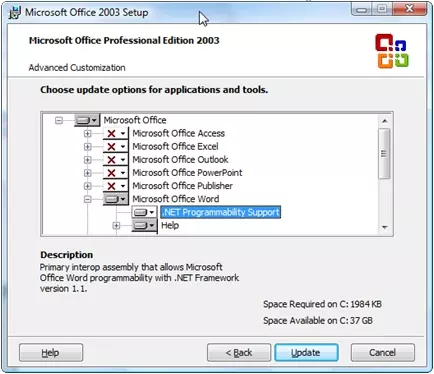
Click "Update" to install this feature. Then redo the installation of Aligned Elements.

The installation stops with an error about stdole.dll. What is wrong?

stdoleerror

Do the following to install the stdole.dll into the GAC:

  • Open a file explorer and navigate to the path: c:\<program files>\Microsoft.Net\Primary Interop Assemblies\. You should be able to locate the stdole.dll file here. If it is not there you can try to find it on another computer in the same location.
  • In a second file explorer, navigate to the path c:\Windows\assembly. Drag and drop the stdole.dll file into this window.
  • Retry the installation of Aligned Elements.
The installation stops with an error about Visual Studio Tools for Office (VSTO). What have I done wrong?

VSTOProblem

You need to reinstall Visual Studio Tools For Office 2005 SE. VSTO 2005 SE can be downloaded here.

When you have downloaded and installed VSTO, then repeat the installation of Aligned Elements.
When running a query I get the error: ' The conversion of a varchar data type to a datetime data type resulted in an out-of-range value.'

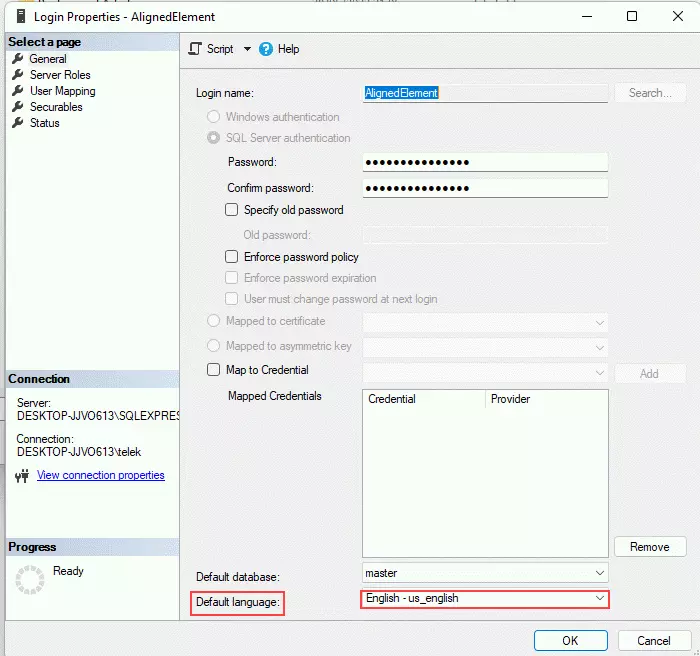
This happens when the database LogIn entity does not have the default language set to 'English'.

Solve the problem by using SQL Server Management Studio to access the LogIn 'AlignedElement' and set the Default Language to English or English-us_english.

 DefaultLanguage.png

My project disappeared and the database seems to be stuck in a pending recovery

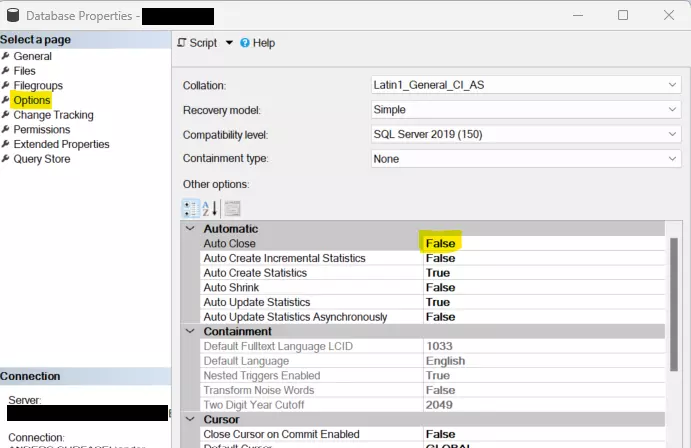
The “recovery pending" status may indicate that you are having the database to auto-close connections.

It should be on False for best performance.

If you are using SQL Server Express, it may default to Auto close true for all new databases. This can be changed in the 'Model' db.

There may be more info on why this happens in the SQL Server ERRORLOG found in a path similar to:

C:\Program Files\Microsoft SQL Server\MSSQL15.SQLEXPRESS\MSSQL\Log

If the database is still stuck in "recovery pending", restarting the SQL Server may alleviate the problem.

Check the database options 'Auto close' property:

autoclose


I am trying to restore a backup from a different server on a new server but I get an error "System.Data.SqlClient.SqlError: The operating system returned the error '3' (The system cannot find the path specified.)' while attempting 'CreateFile' on 'C:\Prog

First, make sure that if the backup was made on a server with fulltext search switched on, the target server must also have fulltext search switched on. Furthermore, check that the user SQLSERVER2005MSSQLUSER$<yourusername>$SQLEXPRESS has write access in the MSSQL directory.

I have installed Aligned Elements but I cannot create offline databases. Why?

Due to windows security restrictions in Windows Aligned Elements cannot create the necessary folders for the offline databases. Try to manually create the path "C:/AlignedElements/Offline" and try again.

When I open the project I get the following message: "InitSubscription failed. Exception: Timeout expired. The timeout period elapsed prior to completion of the operation or the server is not responding."

Open SQL Server Studio Manager and post the following two queries:

ALTER DATABASE "<the database name>" SET NEW_BROKER WITH ROLLBACK IMMEDIATE;

and then

ALTER DATABASE "<the database name>" SET ENABLE_BROKER;

When I restore a database I get the following message:"The SQL Server Service Broker for the current database is not enabled, and as a result query notifications are not supported." What should I do?

Open SQL Server Studio Manager and post the following two queries:

ALTER DATABASE "<the database name>" SET NEW_BROKER WITH ROLLBACK IMMEDIATE;

and then

ALTER DATABASE "<the database name>" SET ENABLE_BROKER;


After having restored a backup / moved a database to a new computer / attached a database, the SQL Server error log is filling up fast with messages like:

"The activated proc '[dbo].[SqlQueryNotificationStoredProcedure-<A-GUID>]' running on queue '.dbo.SqlQueryNotificationService-<A-GUID>' output the following: 'Cannot execute as the database principal because the principal "dbo" does not exist, this type of principal cannot be impersonated, or you do not have permission.'"

What should I do?

A: Open SQL Server Studio Manager and run the following query:

ALTER AUTHORIZATION ON DATABASE:: "<the database name>" TO AlignedElement;

If you now get a new error message indicating that the SqlQueryNotificationService couldn't locate itself, run the following queries:

ALTER DATABASE "<the database name>" SET DISABLE_BROKER;

ALTER DATABASE "<the database name>" SET NEW_BROKER WITH ROLLBACK IMMEDIATE;

and then

ALTER DATABASE "<the database name>" SET ENABLE_BROKER;