Zum Hauptinhalt springen

EN

Aligned Elements V2.6 released

What's New

{fastsocialshare}

Aligned Elements V2.6 (2.6.157/401.20382) is here and includes new capabilities and numerous bug fixes.

Chapter Descriptions

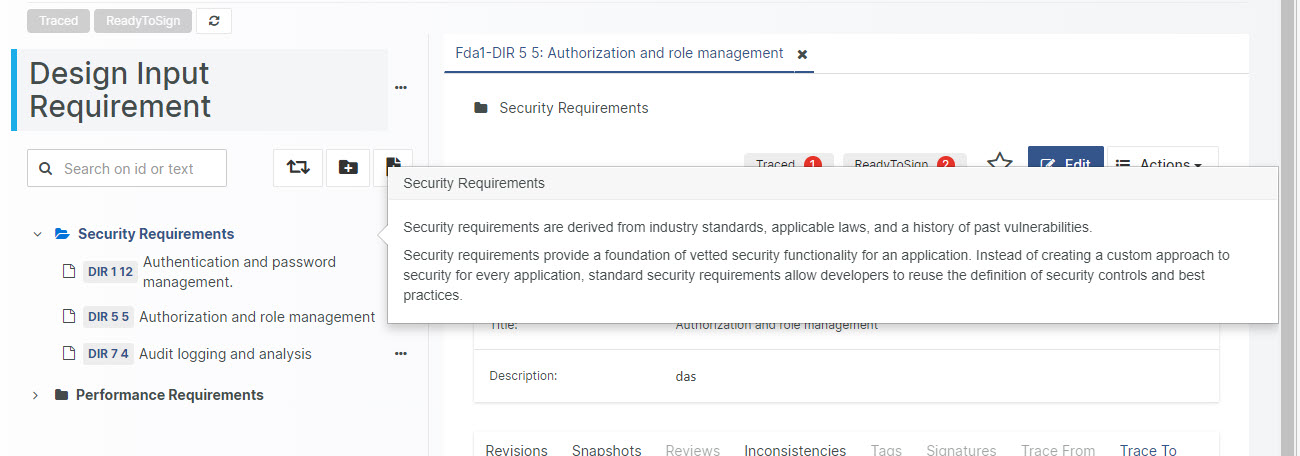
Use Chapter Descriptions in Aligned Elements to add text displayed right below the Chapter when inserted in a Word Document. 

Chapters


Create rich Design Controls using Traced Object Attributes

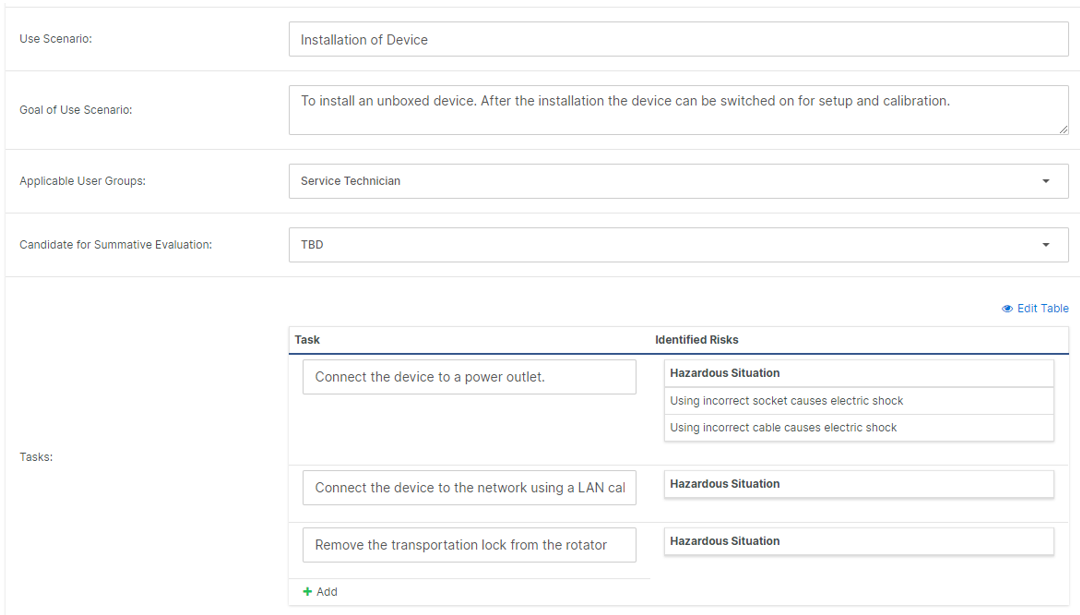
The traced object attribute permits you to display data from traced objects in your Design Control. This can be singles Design Controls or lists of Design Controls, appear being embedded as attributes in your main Design Control.

Traces 


Inspect indirectly traced Design Controls 

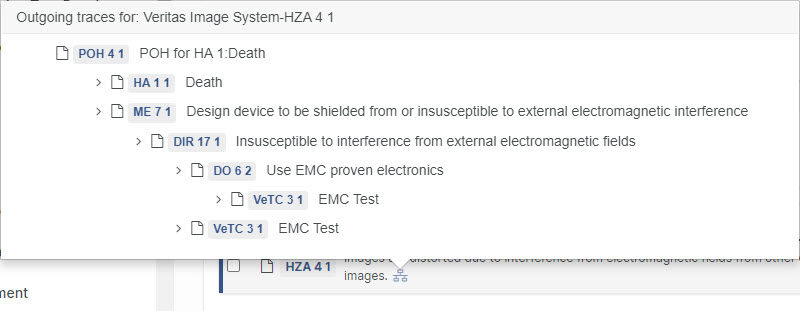
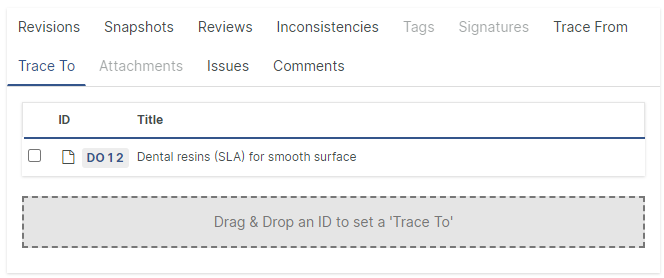
Hover with the mouse on trace inthe 'Trace To' and 'Trace From'-tabs to see indirect outgoing or incoming traces.

Traces

What's Changed

  • Trace Tables from Snapshot
  • Automatic Recovery of Unsaved Data
  • User Right for Test Run Management
  • Promote Comments to Issues in Review Feedback Overview
  • Trace Table allows "Upward" and "Advanced" at the same time
  • Export and import of Tags
  • File Object Revision History indicates Signed Documents
  • GemBoxPDF as new standard PDF Converter
  • Security Updates

Upgrade now

With new features and important fixes, this release is a recommended upgrade.
Find the installer to Aligned Elements V2.6 here.

The Aligned Elements OWASP Top 10 Checklist available now

As a medical device manufacturer, you are probably well aware of the increasing focus on cyber security. When developing your device, you are responsible for ensuring that it is safe to use from a cyber security perspective.
I think it is safe to say that the attention placed on cyber security aspects by autors and national authorities will only increase in the coming years.

FDA has issues a number of guidelines on how to implement and apply cybersecurity both on a process and product level. It is up to you as a medical device manufacturer to provide adequate cyber resilience in your products as well as the documentation required to prove it.

Aligned Elements users have for a long time been able to leverage Cyber Security extensions in their Aligned Elements configurations such as the Medical Device Cybersecurity Risk Assessment Templates and the Johner Institute Medical Device IT Security Product Requirements.

We are now happy to include the new OWASP Top 10 Checklist to our library of Cyber Security Extensions.

TOP 10 logo Final Logo Colour

What is it?

OWASP stands for “Open Web Application Security Project”. It is a non-profit entity with international recognition and focuses on collaboration to strengthen software security around the globe.

OWASP publishes the OWASP Top 10 list, which provides rankings of, as well as a remediation guidance for, the top 10 most critical web application security risks.

It uses the extensive knowledge and experience of the OWASP’s open community contributors, and is based on a consensus among security experts from around the world.
The OWASP Top 10 risks are ranked according to the frequency of discovered security defects, the severity of the uncovered vulnerabilities, and the magnitude of their potential impacts.

You can now easily assess and automatically document how well your medical device application stands up against the OWASP Top 10 by applying the Aligned Elements OWASP Top 10 Regulatory Assistant in your Aligned Elements projects.

How does it work?

This Assistant takes the shape of a Checklist where you assess your own medical device against the OWASP Top 10 security risks.

You start out by assessing whether the risk is applicable to your device at all, and if not, provide a qulified answer why this is not the case (the auditors rewards such qualifications).

If the risk is applicable, you are required to refer to the Aligned Elements Design Control Items that addresses the risk by selecting them in the UI.
You can compare your risk reduction controls against known best-practice remidiations mentioned in the OWASP Top 10 list.

When the checklist is completed, a Regulatory Assistance item is generated, containing all steps and your provided answers. This information remains stored in Aligned Elements for compliance purposes.

The OWASP Top 10 Regulatory Assistant Checklist is free to all Aligned Elements customers and can be applied to any Aligned Elements Web Server installation.

Note! The OWASP Top 10 Regulatory Assistant Checklist only works in Aligned Elements.

Webinar: New in Aligned Elements V2.5 SP 6-7

{fastsocialshare}

In this latest release of Aligned Elements, you can find...

  • Drag and Drop Support
  • Resolve inconsistencies by click
  • Positive Cues
  • Regulatory Assistants


The webinar can be viewed below:

Enjoy!

Aligned Elements V2.5 SP 7 Hotfix released

What's New

{fastsocialshare}

Aligned Elements V2.5 Service Pack 7 (2.5.148/377.19484) is a hot fix for V2.5 SP 6 to fix a few important errors detected in that version.

Upgrade now

This release is a recommended upgrade.
Find the installer to Aligned Elements V2.5 SP 7 here.

Aligned Elements V2.5 SP 6 released

What's New

{fastsocialshare}

Aligned Elements V2.5 Service Pack 6 (2.5.144/373.19437) is here and includes new capabilities and numerous bug fixes

Drag and Drop Operations in Web Client

Setting incoming and outgoing traces and adding attachments is now possible using drag and drop, a faster and more intuitive way to work. 

Drag_And_Drop.PNG


Fixing Inconsistencies on the spot 

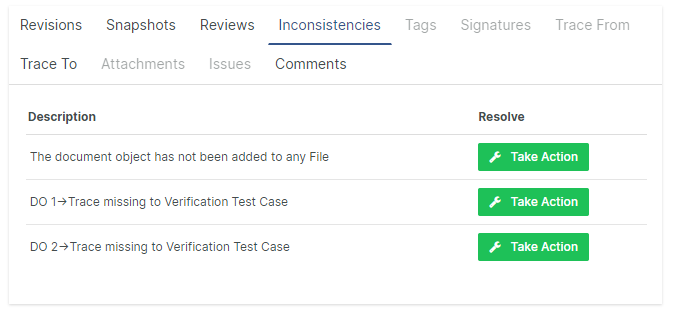
Unveiling inconsistencies and quality errors has always been one of the great advantages with Aligned Elements. Now, inconsistencies can be solved on the spot with just a few simple clicks. Aligned Elements offers a well curated selection of solutions to choose from, all adapted to your configuration, your access rights and the current project context. 

Resolve.PNG 


Positive Cues - Indication of the Design Control's "health"

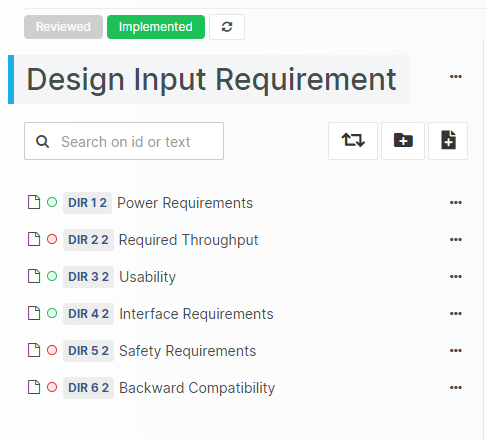
A Document Objects "health" is clearly displayed as a coloured dot in several list views. A Positive Cue is a collection of inconsistency rules that are evaluated together. The Positive Cue bar displays all Positive Cues available for the Design Control and also gives direct access to resolution options.

Positive Cues


Regulatory Assistants 

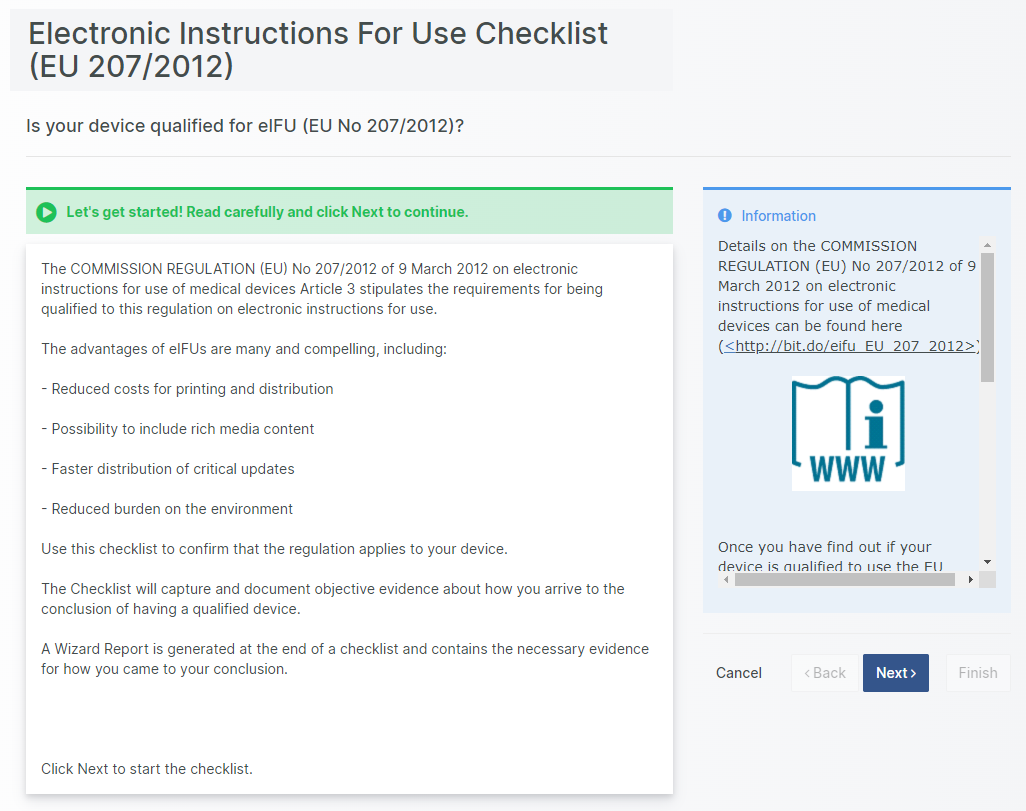
Run a Regulatory Assistant to quickly create or import Design Control items from predefined repositories and/or dynamically created items based on your user input.

Assistant 

What's Changed

  • Paste Images directly into Richtext and Table Attributes
  • Possibility to Map unknown import data to known project data
  • Assign User Groups as signees
  • Enforce order of Signing
  • User Management Enhancement
  • Allow adding new entries to Dynamic List Attributes on the fly
  • Two Factor Authentication in Web Client
  • Test Run: Batch Assign Users and Configurations to Test Cases

Upgrade now

With new features and important fixes, this release is a recommended upgrade.
Find the installer to Aligned Elements V2.5 SP 6 here.

Design Controls according to IEC 82304

{fastsocialshare}

When you think about standards for medical device software, IEC 62304 is probably the first one that comes to mind. If you develop software for medical devices, this is definitely the standard you should look into.

Less known is IEC 62304's bigger brother, the IEC 82304 "Health software — Part 1: General requirements for product safety" which expands on the IEC 62304.

So what are the main differences?  When shall I use which standard?

Differences between IEC 62304 and IEC 82304

Scope

IEC 82304 targets a larger range of device types than IEC 62304. IEC 82304-1 targets any kind of software, which directly or indirectly has an effect on health, known as "health software" in the standard.
In contrast, IEC 62304 only targets software with medical intended use.
Examples of device types that are in the scope IEC 82304 but not IEC 62304:

  • Radiology Information Systems
  • Prescription Management Systems
  • Laboratory Information Management Systems
  • Mobile Apps (not defined as FDA Mobile Medical Apps)

Standalone

IEC 82304 is intended for standalone software and not as IEC 62304, software embedded in medical devices or embedded in devices with specific hardware.
Software running on PCs, Server or Mobile Devices on a general purpose Operating System are in the scope of IEC 82304.

Product Life Cycle Stages and Design Control Levels

As mentioned, IEC 82304 expands on IEC 62304 and addresses both additional Design Controls and requirements on expanded parts of the Product Life Cycle.
It includes Product Use Requirements as well as Product Validation Plans and Reports. It specifies requirements on Product Identification and Instructions For Use as well as Post-market activities.

IEC 82304 references IEC 62304 for software development and maintenance, i.e. on a software level.

Aligned Elements IEC 82304 Configuration

The Aligned Elements IEC 82304 configuration is a superset of the IEC 62304 configuration. It expands the IEC 62304 configuration with Product Use Requirements and Product Validation Tests. It has been tuned to automatically take care of most of the involved quality checks, making sure that the required tasks and actions are sufficiently covered.

The Aligned Elements IEC 82304 configuration contains:

  • Pre-configured templates using IEC 82304 standard naming conventions
  • Software Safety Classification automatically based on risk analysis results
  • Numerous quality checks for consistency verification
  • Pre-configured Reviews and checkpoints according to IEC 82304 and IEC 62304 stipulations
  • Pre-configured Trace Tables based on the IEC 82304 and IEC 62304 requirements
  • A set of document templates being a great starting point for your documentation
  • 48 importable Product Use Requirements for Accompanying Documentation from IEC 82304

The Aligned Elements IEC 82304 supports documentation management of:

  • Product Use Requirements
  • Product Validation Tests and Results
  • System and Software Requirements
  • Software Architecture building blocks(Software Items, Units, SOUPs, and segregations)
  • Risk Management using a Preliminary Hazard Analysis technique (listed in ISO 14971)
  • Software Verification  (Unit, Integration and System testing)
  • Change and configuration management (Problem Reports and Change Management)

The Aligned Elements IEC 82304 Configuration can be downloaded here.

Webinar: New in Aligned Elements V2.5 SP 5

{fastsocialshare}

In this latest release of Aligned Elements, you can find...

  • A new Review Feedback Overview
  • Project Maintenance Actions for Web Admins
  • Several improvements on popular request


The webinar can be viewed below:

Enjoy!

Aligned Elements V2.5 SP 4 released

What's New

{fastsocialshare}

Aligned Elements V2.5 Service Pack 4 (2.5.344/120.17963) is here and includes some awesome new features and a host of bugfixes


Web Client UX Overhaul

A host of new UX features and an updated color scheme makes the use of Aligned Elements an even more efficient and pleasurable experience.


New Design Review Experience 

Let each Review Team members inspect and provide feedback on Items under Review, aided by great analytics and feedback capabilities.


Highlight Inconsistent Items in Word

For easier inspection and faster reviews, automatically highlight inconsistent items in word documents to quickly visualize and address outstanding issues.


What's Changed

  • Integration with Subversion
  • Integration with GitLab
  • Configurable Email content
  • Update Fonts in items with Batch Change
  • Replace Words in items with Batch Change
  • Queries for External Issue items
  • Automatic Change Comments
  • New Inconsistency Rule: check for unreviewed items in Documents
  • New Inconsistency Rule: item must exist in signed Document
  • Warn when trying to edit item currently under Review
  • Group Attributes in Form
  • New Approval Attribute
  • Risk Summary Widget in Dashboard
  • Centralizing User Management in Web

Upgrade now

With exciting new features and important fixes, this release is a recommended upgrade.
Find the installer to Aligned Elements V2.5 SP 4 here.

Aligned Elements V2.5 SP 5 released

What's New

{fastsocialshare}

Aligned Elements V2.5 Service Pack 5 (2.5.357/130.18463) is here and includes some awesome new features and a host of bugfixes


Web Client Admin Operations

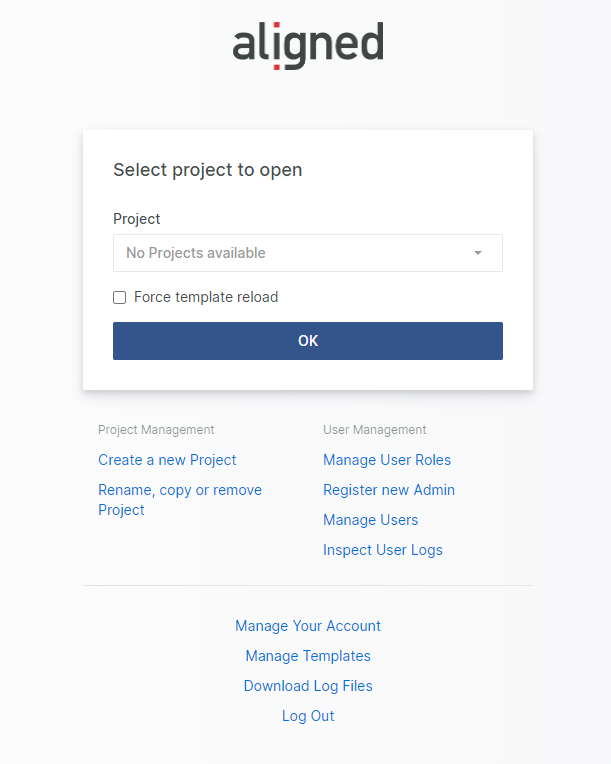
Web Admins now have direct access to database management, template management and enhanced user management.


Web Admin


Design Review Feedback Overview 

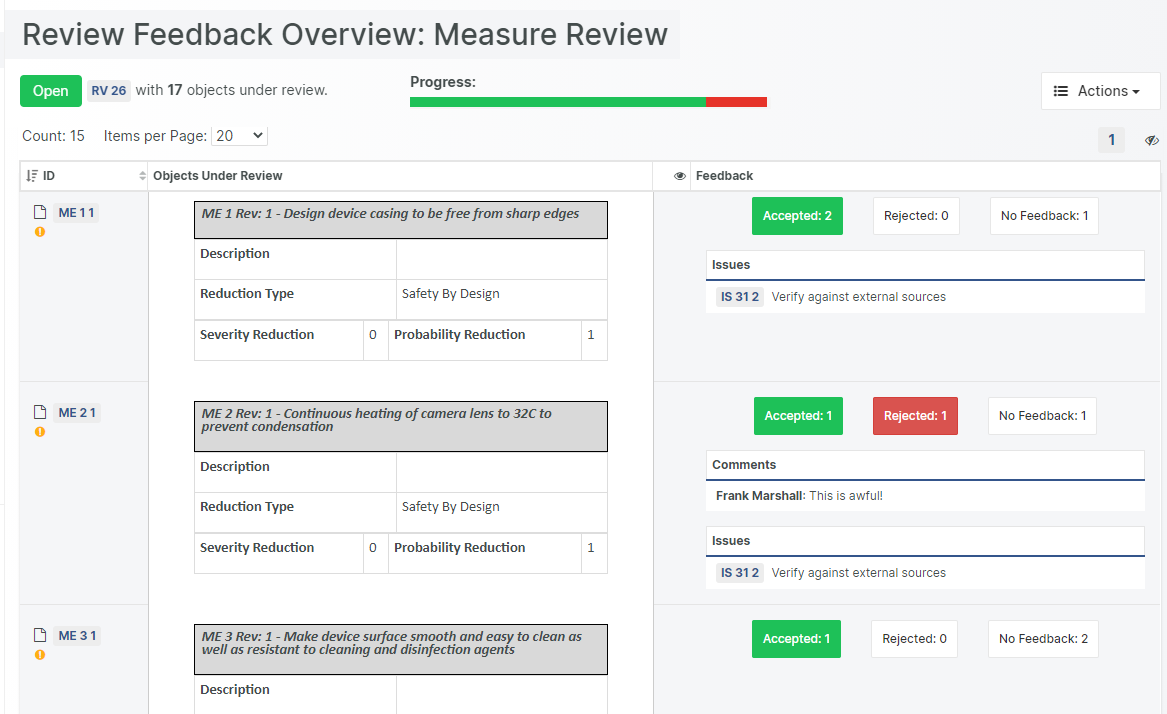
A new feedback overview displays the aggregated feedback from all users participating in the review.

 Reveiw Feedback


What's Changed

  • Insert Project Information attributes into Word as fields
  • Separate scrolling of Base form and Chapter list (Web Client)
  • Add to Test Run from Form (Web Client)
  • Add to Tag from Form (Web Client)
  • Enhancements in Issue proxy Authentication process 
  • Optional prohibition of Severity reduction FMEA:s 
  • Revision list always displayed with the latest revision on top (Web Client)
  • Allow use of text color and text background color in Rich Text and Table Attributes (Web client)

Upgrade now

With new features and important fixes, this release is a recommended upgrade.
Find the installer to Aligned Elements V2.5 SP 5 here.

Software Hazard Identification based on IEC 80002-1 Annex B

{fastsocialshare}

ISO 14971 provides great assistance when identifying potential Hazards through its annexes, but it does lack a strong identification catalogue for Software Hazards. 

Luckily, IEC TR 80002-1:2009 Annex B comes to rescue. This Technical Report, "Medical device software - Part 1 Guidance on the application of ISO 14971 to medical device software", takes a software angle on ISO 14971, just as the title suggests.

Annex B of the report elaborates on possible software hazards and factors to consider in order to properly assess whether and how they are applicable to a particular device. 

To assist the risk identification of software hazards, we have built this extension, inspired by the Annex B of IEC/TR 80002-1. 

It includes:

  • RVT file for a Software Hazard aspect and a corresponding DOCX Reporting style template
  • 70+ importable potential Software Hazards to assess and integrate into your Risk Assessment

You may of course expand this hazard list with hazards that are particular to your device and the conditions under which it needs to operate.  

This extension package can be combined with other risk identification packages from Aligned or in-house developed approaches by the manufacturer.

The "Software Hazard Identification based on IEC 80002-1 Annex B"  extension is free to Aligned Elements users.

For more information on how to include the hazards in your risk assessment, contact the Diese E-Mail-Adresse ist vor Spambots geschützt! Zur Anzeige muss JavaScript eingeschaltet sein. today.