
form test
This is a test form:
This is a test form:
[forms ID=1]
{chronoforms7}free-trial-copy-20230522-115726{/chronoforms7}
Stay ISO 14971 compliant and in control
{chronoforms7}free-trial{/chronoforms7}
Quickly reach compliance with ISO 14971 - Application of risk management to medical devices?
Do risk analysis your way and not the way a tool prescribes it?
Automatically ensure that your mitigations are implemented?
Use pre-configured Potential Hazards from ISO 14971?
Monitor the effect of your mitigations in a pre- and post-mitigation Risk Summary?
Be warned if you have incomplete risk coverage or unmitigated risks?
Spend less time on maintaining documents?
By easily tracing ISO 14971 risk controls / mitigations to your design inputs
By automating checks for not implemented mitigations
By checking the completeness of your risk management in seconds
By re-using mitigations to save time and ensure consistency
By using configurable (preliminary) hazard analysis (PHA) and FMEA in a single tool
By creating and updating your risk management files at the press of a button
Lower costs for development
Minimize the work on development documentation
Free up personel for innovation
Bring your Medical Devices to the market faster
reach compliance fast
Manage and Trace your Requirements
Integrate your ISO 14971 compliant Risk Management
Effectively manage and document your traceability matrix
Define and execute Test Protocols
Perform Design Reviews
If you cannot spare the time to do your own evaluation, let us show Aligned Elements to you in a personal online demo!
This takes about 60 minutes and afterwards you know what Aligned Elements can do for you.
The online demo can also be an efficient kick-start for your own evaluation.
So go ahead and schedule a demo with us!
ISO compatible
continuous
End-to-end Traceability over all Design Controls
Integrate Traceability with ISO 14971 Risk Assessments
Continuous Traceability Quality Monitoring with graphical coverage
Predefined Medical Device Traceability Tables for IEC 62304
Automatically generated and synchronized traceability documentation
Lower costs for development
Minimize the work on development documentation
Free up personel for innovation
Bring your Medical Devices to the market faster
[forms ID=1]
If you are logging in for the first time and have problems, we have detailed instructions in the user manual.
The most common situations for not being able to log in for the first time are:
Click on the situation that applies to you for explanations and troubleshooting steps.
If you have log in problems in general or, e.g. after resetting your password, there are instructions and tips available here.
The most common situations for not being able to log in are:
Where applicable, click on the situation that applies to you for explanations and troubleshooting steps.
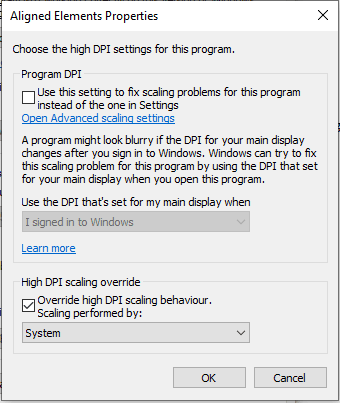
For an optimal display of the Aligned Elements windows client on high screen resolutions, use the "Override High DPI Settings"
How to do it:
1) Find the Aligned Elements shortcut
2) Display Properties (right-click on the short cut) => Compatibility Tab
3) At the bottom of the tab click "Change high DPI settings"
4) At the bottom of the displayed dialog, in the section "High DPI scaling override", tick the check box for "Override high DPI scaling" and select "System" (and not e.g. "System (Enhanced)") in the dropdown.