
Zum Hauptinhalt springen

EN

A New Level of Efficiency and Usability - New Features coming soon!

{fastsocialshare}

After nine months of development, we are excited to introduce the latest version of Aligned Elements. This update brings a sleek and improved UI, along with a range of usability enhancements designed to make your design control and risk management processes smoother than ever.

We know that efficiency is key for medical device professionals navigating complex regulatory requirements. That’s why we’ve focused on making Aligned Elements faster, more intuitive, and easier to use in this release - so you can spend less time managing documentation and more time driving innovation.

Here are some UI highlights in this new release:

Compact Form Layout

For attribute-rich Design controls, this new, optional display-style provides a clearer and more compact display of your data. The Compact Form option puts attributes side-by-side, with up to four attributes being placed on a single row.

Your important information becomes immediately visible with less need for scrolling! 
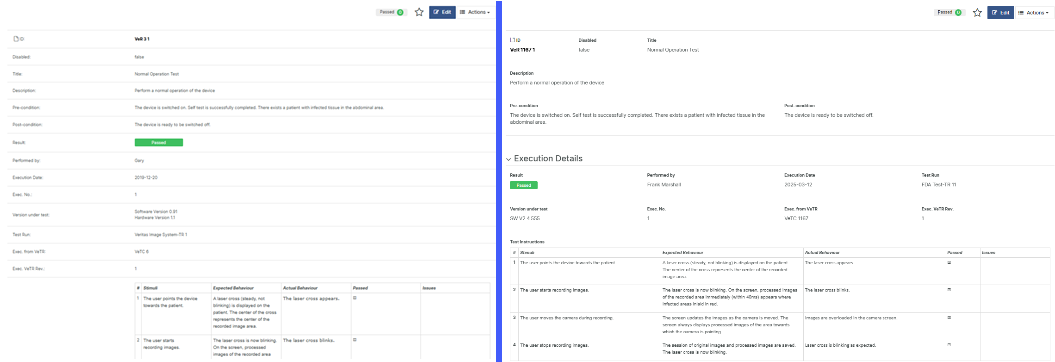
BeforeAfter

Above we see a comparison of identical data, in this case a Test Result, using the Classic Layout to the left and the Compact Form Layout to the right. As you can see, the Attribute name/label is display above the control instead of to the left. This makes it possible to maximize the use of horizontal space, which comes in very handy for e.g. Table Attributes and Traced Object Attributes.

We also introduce collapsible subsections. You now group attributes in themes or topics and place them into sections that can be expanded or collapsed by the user.

Sections

Introducing optional fixed width on selected column in Table Attributes allows optimized use of screen space. Make Checkbox and Dropdown columns narrow and free up horizontal space for descriptive columns instead.

Improved side-by-side scrolling in the Main View

A much wanted feature is the independent scrolling of the Chapter List (on the left side of the main view), and the Design Controls Tabs (on the right side of the view). The scrolling of these two sections can now be done independently.

 sidebysidescrolling

As a consequence, we have also moved the Tags and the Positive Cues from the top of the main view, to the top of the Chapter View. The much more space-saving Tag bar now only displays tags applicable to the current type. We end up with a cleaner and more user-friendly layout. 

Introducing Trace Lists

Traceability is a cornerstone in Medical Device Design Control Management and Technical Documentation creation. It helps us to verify our Design Control structure is complete, correct and consistent. Aligned Elements makes intense use of traceability, leveraging this information as much as possible in order to deliver insights and solutions to Design Control problems.

Traces are always displays at the bottom of each Design Control form in the 'Trace From' and 'Trace To' tabs of the Detail View section. However, it is sometimes beneficial to show a curated selection of incoming or outgoing traces directly in the form. For this purpose, we introduce Trace Lists. Trace Lists can be used to provide important context by displaying trace information in the form itself.
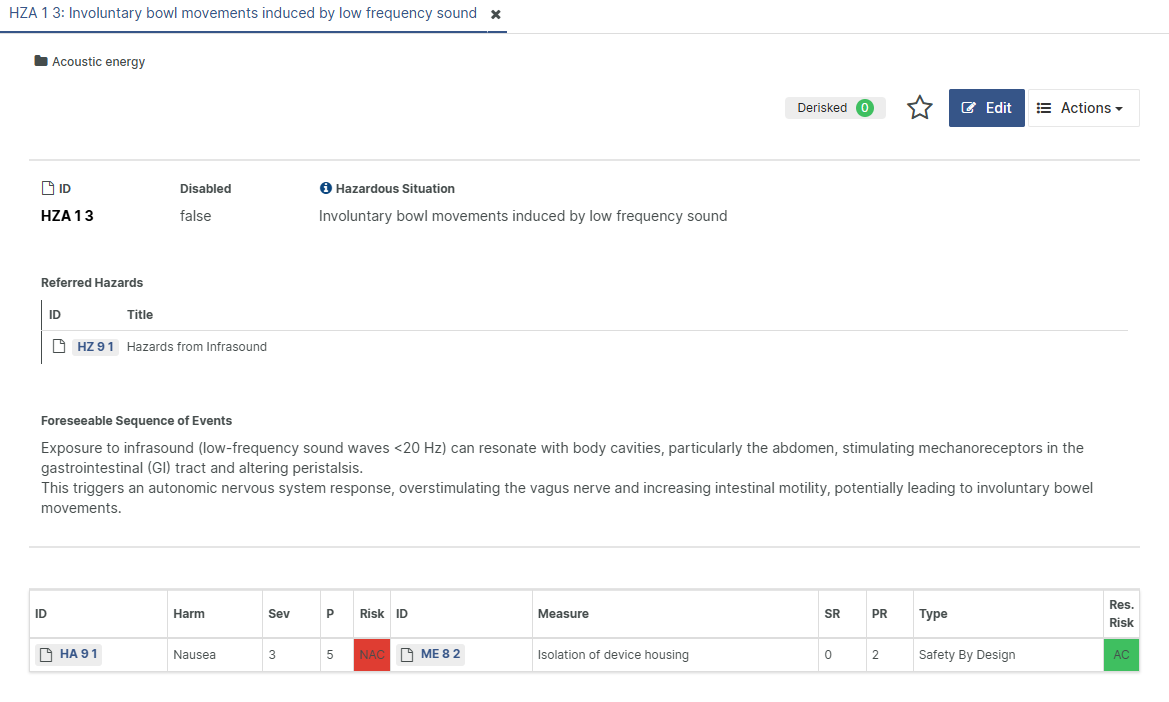
TraceList

In the example above, the referred Hazard is displayed at the top of a Hazard Analysis item to provide context to the Risk Assessment being carried out.

Trace Lists are added via configuration and does not implicate a revision change.        

And much more!

These are three examples of UI improvements in Aligned Elements V3.1 but there are of course many, many other features included as well. We'll introduce multi-column filtering in grids, adding / removing individual values to multi-select attributes using 'Update Multiple Items', emailing to e.g. currently logged in users in 'Manage Users', search-as-you-type filters as standard in dropdown and multi-select lists and many, many more things.

To find out more about the new things in Aligned Elements V3.1, sign up to the "What's New in Aligned Elements V3.1" online seminar broadcasted on April 3rd.

AI Support in Aligned Elements - New Feature coming soon!

Over the last 6 months, we’ve been investigating how using AI can make Aligned Elements faster, more efficient and more helpful.

Now, three new AI features for better Design Control management are being placed to your fingertips. We’re making it easier to create test cases, to locate the best traces, and to write distinct item titles and for your design control.

 AIpowerHumanDriven

Automatic writing of Test Cases

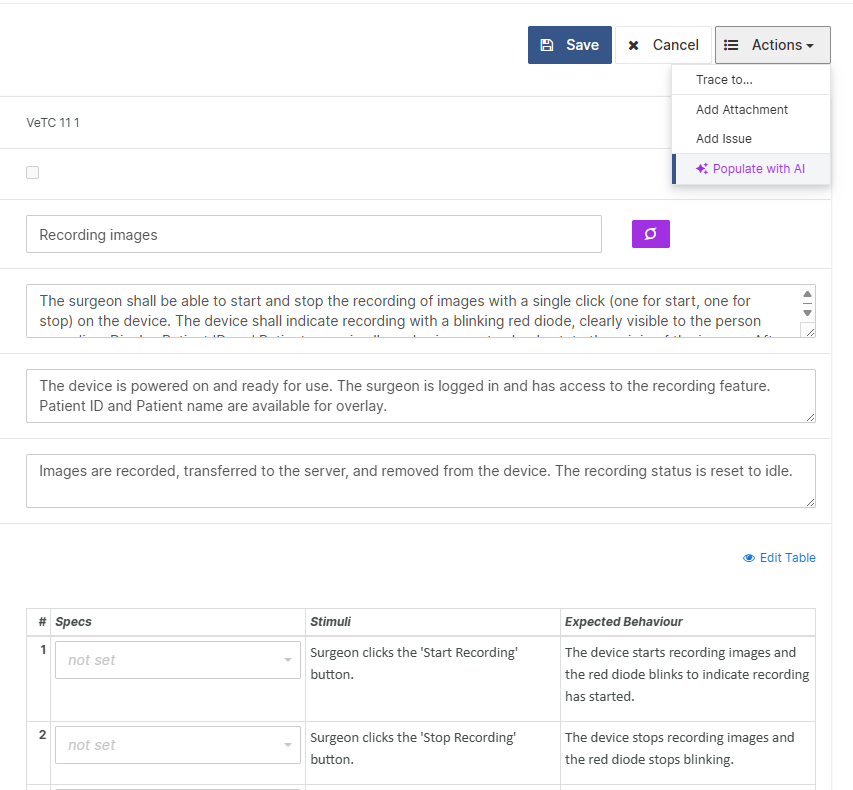
Our new feature introduces an AI-driven approach to automatically populate test case attributes, including test steps, based on the traced requirements and specifications. By creating an instance draft of a test case, the test engineer can then analyse and refine the suggested test case content.

PopulateWithAI
This method reduces the manual effort involved in test case authoring and enables your team to focus on other critical aspects of development. With a balanced approach of AI automation and human precision, we offer a pragmatic solution to modern quality assurance challenges.

Let AI suggest the best traces

When large Design Controls set find themselves in constant flux, where items are added, removed and modified, it is not easy to know if the current traces are the correct ones.
It is simply not possible to keep all the items in your head, and elaborate searching is needed to make sure that all traced items have been correctly identified.

SuggestTraces

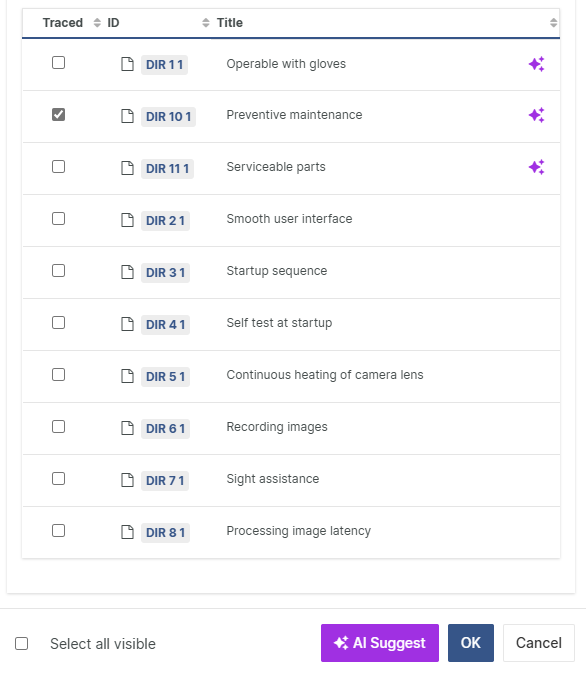
With AI-powered assistance, Aligned Elements analyses the entire list of potential trace candidates, compares the current design control with the content of the list and automatically suggests the best matching traces. Using our "AI powered-human driven", the user has the final say in deciding whether the suggestions are correct and ultimately sets the traces. This functionality not only assist when setting new traces but also provides a robust mechanism for cross-checking and validating existing ones.

Create a summarized title with a single click

All Aligned Elements Design Controls require a title that epitomizes what the Design Control is about. The title is also the primary text displayed in Design Control lists, and thus serves as your visual cue for the item. It is not always obvious how to summarize an elaborate Design Control in the best possible way.

Summarize

Here, again, AI comes to rescue. Our last feature is built to automatically write a short and snappy title that accurately describes the Design Control. With a single click, the AI analyses the Design Control content (you, of course, decides which aspects the AI shall consider) and automatically populates the title field with a summarized text.  

How can I get these features in my Aligned Elements?

These features (which are supported exclusively by the Aligned Elements Web Client) are available in our upcoming release Aligned Elements V3.1 with a planned released on March 31st 2025. The first step is thus to upgrade to this version of Aligned Elements. All three features are switched off by default and only becomes available when explicitly added through configuration, each one configured separately.


Contact your Aligned representative for more information, on how to conduct trials with your own data and assistance on how to make the configuration changes. 
Note that Aligned Elements AI features may incur additional costs.

Aligned Elements—A System That Adapts to You, Not the Other Way Around

{fastsocialshare}

Do you make medical devices?

If yes, you’re likely familiar with the technical documentation challenges that come with the territory.

We provide an excellent system to help you overcome those challenges.

"But how do I know that such a system won’t disrupt my processes?"

Good question!

You are the expert on your product and your organization. You’ve invested considerable effort in refining your processes and templates to optimize your work. The last thing you need is a tool that forces you to rework everything.

Not Aligned Elements.

Where other tools impose limitations that require substantial changes to your QMS, Aligned Elements adapts to your needs. From the start, we recognized that each medical device manufacturer operates with a unique set of SOPs, processes, and templates, carefully developed to suit their specific requirements. That’s why we designed Aligned Elements to be flexible—so it can reflect your processes, use your document templates, and present your terms and notions in the UI.

This results in higher user acceptance, a lower learning curve, a shorter adoption process, and reduced implementation risks.

How Aligned Elements Adapts to Your Needs

Design Control Naming and Traceability

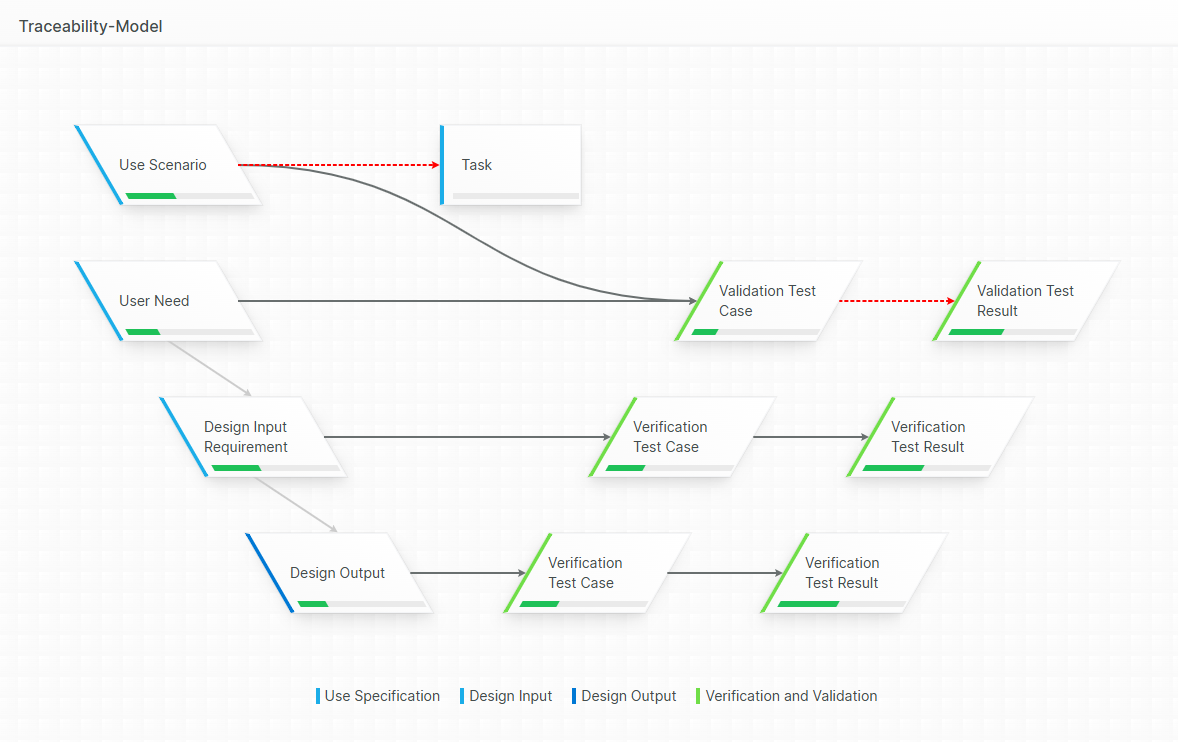
We begin by identifying all your Design Control types and their expected traceability. We then ensure that each type includes exactly the data specified in your SOPs and templates. This significantly accelerates adoption, as your users will immediately recognize familiar terminology and structures.

Traceability_Model.jpeg

Trace Reporting

Our built-in Trace Table Designer allows you to create customized trace tables and matrices on the fly. Simply generate a trace table, inspect the results, modify the design, and rerun it within seconds. These traceability matrices can be exported into Word documents that maintain your unique corporate design.

Tailored Risk Assessments

RiskSummary.jpeg

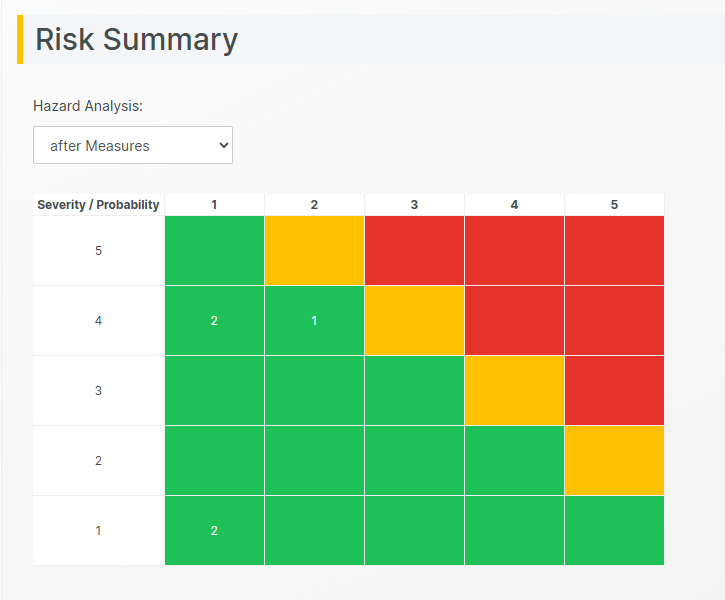
While ISO 14971 provides a standardized framework, we have found that risk assessments vary widely between organizations. Among the hundreds of medical device manufacturers we’ve worked with, each has had its own approach to risk assessment.

To accommodate this, we designed the Aligned Elements Risk Assessment section to be the most adaptable in the industry—and we continue to expand its capabilities.

Creating Technical Documents

Your QMS already includes tried-and-tested document templates—why not use them in Aligned Elements? Documents generated by Aligned Elements adopt the styling and structure of your existing templates while seamlessly integrating Design Control content.

You can mix and match structured data with anything created in MS Word, ensuring you get the best of both worlds. For maximum flexibility, Aligned Elements supports different Word styles for different contexts, such as formal styles for official documents and informal styles for internal reviews—giving you complete control.

Seamless Integration with Your Existing Toolset

Aligned Elements is explicitly process-independent, offering high flexibility in naming conventions and reporting formats to fit seamlessly into your workflow. It integrates with existing tools such as defect tracking systems (GIT, Atlassian Jira, Azure DevOps, Redmine, Trac, etc.), enhancing their capabilities with consistency checks, traceability, and reporting features.

What About Cost and Implementation Time?

We help every customer set up Aligned Elements according to their specific needs. This process typically takes only a few days. You can find pricing details [here].

Are You Forever Dependent on Our Expertise?

Absolutely not. As an Aligned Elements customer, you own your configuration. You can access and modify it at any time.


Thumbnail Designed by vectorjuice


Aligned Elements V3.0 Service Pack 1 released

Aligned Elements V3.0 Service Pack 1 (3.0.447/231.22672) is released.

What's New

V3.0 Service Pack 1 contains a number of important fixes for Aligned Elements V3.0.

The Release Notes describing the fixes can be found here.

Upgrade Now

This release is a recommended upgrade.
Find the installer to Aligned Elements V3.0 Service Pack 1 here.

Webinar: New in Aligned Elements V3.0

{fastsocialshare}

We are proud to present Aligned Elements V3.0, that includes:

  • Released Document View
  • Generate and Autopopulate Documents
  • An upgraded Review Experience
  • More than 250 new features and fixes

If you are interested in an in-depth demonstration of Aligned Elements, contact us on Diese E-Mail-Adresse ist vor Spambots geschützt! Zur Anzeige muss JavaScript eingeschaltet sein..

The webinar can be viewed below:

Enjoy!


Aligned Elements V3.0 released

Aligned Elements V3.0 (3.0.443/222.22517) is here, and we are proud to includes new capabilities and numerous bug fixes.

What's New

V3.0 is a large update, and we introduce a host of new features in this one.

Get the full story on some of the new features in Aligned Elements V3.0 below:

The Release Notes containing all new features and fixes can be found here.

Sign up to the "What's New" Webinar on April 16th

Curious to see the new features live?

Want to gain a deeper insight into what Aligned Elements V3.0 can do for you?

Register today to the "What's New" Webinar

When: Tuesday, April 16, 2024

Time: 15:00 CET (45 Min)

Use this link: Sign up

Upgrade Now

This release is a recommended upgrade.
Find the installer to Aligned Elements V3.0 here.

Hotfix Aligned Elements V2.6 Service Pack 2 released

With the Hotfix Aligned Elements V2.6 Service Pack 2 (2.6.425/180.21104) we have fixed an important bug detected in V2.6 SP 1.

This bug fix concerns the trace direction of traces between Causes and Risk Analysis/Hazards Analysis objects in the Web Client, which were, at times, incorrectly set in V2.6 SP 1. 

Release notes can be found here.

This release is a recommended upgrade.
Find the installer to Aligned Elements V2.6 SP 2 here.

Webinar: New in Aligned Elements V2.6 Service Pack 1

{fastsocialshare}

In this latest release of Aligned Elements V2.6 Service Pack 1, we tell you all about...

  • Search-as-you-type in the Word Add-In
  • Import Files in batch
  • User and Project Management improvements
  • Integration with Open AI


The webinar can be viewed below:

Enjoy!

Aligned Elements V2.6 Service Pack 1 released

What's New

{fastsocialshare}

Aligned Elements V2.6 SP 1 (2.6.176/419.20790) is here and includes a number of bug fixes and a couple of new features.

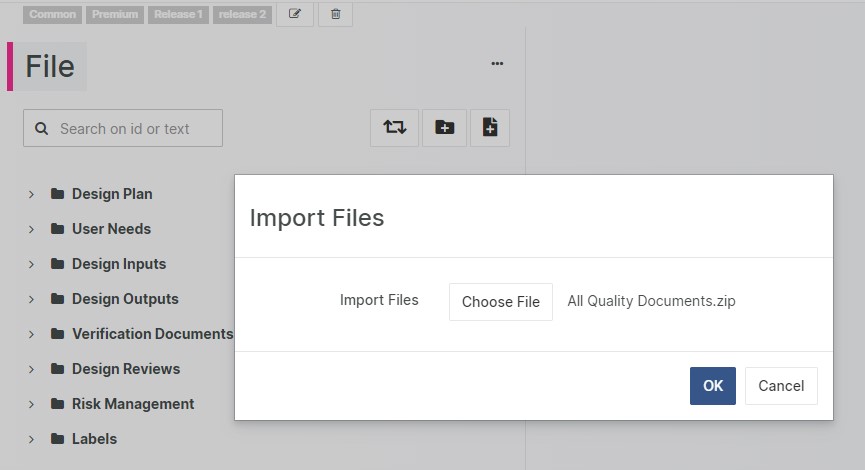
Upload Multiple Files

Perform bulk upload of files with a single click to Design Control types like Files and Attachments. Aligned Elements automatically creates the item, attaches the file, sets the title and recreates the chapter structure from the uploaded folder structure.   

 Import Files

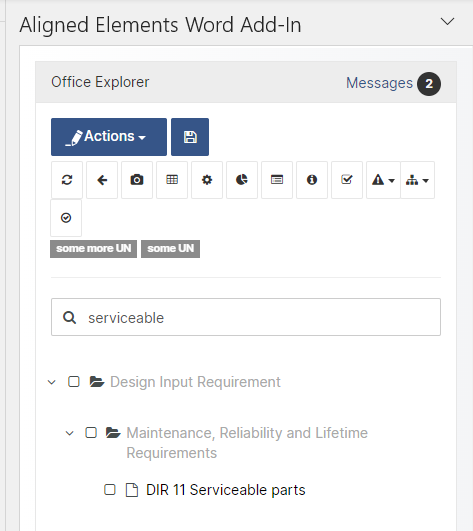
 Search-as-you-type in Word Add-In

Locate your target Design Control Items quickly with search-as-you-type in the Aligned Elements Word Add-In.

  Serach as you type

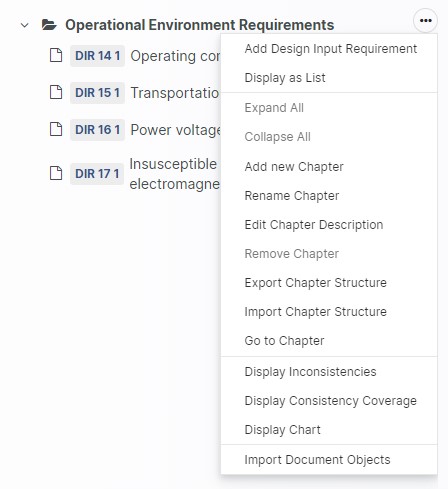
Import Design Controls to selected Target Chapter 

More control over your import actions are facilitated with the new option of importing Design Control Items into a selected chapter.

Import in Chapter

What's Changed

  • Aligned Elements Automator runs on both Linux and Windows
  • Customize wording for risk labels (Acceptable, ALARP, Inacceptable)
  • Improvements in Font and Formatting control
  • More control over Exported Excel Reports
  • Automatic email send out for signatures with enforced signing order
  • Prevent selected attributes to be copied at Generate
  • Display total number of Active Users
  • SQL Server 2022 compatibility

Upgrade now

With new features and important fixes, this release is a recommended upgrade.
Find the installer to Aligned Elements V2.6 SP 1 here.

Webinar: New in Aligned Elements V2.6

{fastsocialshare}

In this latest release of Aligned Elements V2.6, you find great new features such as...

  • Trace Tables based on Snapshots
  • Chapter Descriptions
  • Traced Object Attributes
  • Automatic Recovery of Data


The webinar can be viewed below:

Enjoy!